
Appearance
制造订单开始安排日期与结束日期
1. 功能简介
在制造订单中,开始安排日期与结束日期是用于表示订单的开始和结束时间。开始安排日期是指订单开始生产的日期,结束安排日期是指订单完成生产的日期。这两个日期对于生产计划的制定和执行非常重要。我们在使用过程中,经常会遇到我建立订单的时候明明选的是几月几号,为啥等我去点击安排的时候,结束日期会发生改变,特别是哪些多级BOM的订单,这个变化更是让人摸不着头脑,今天我们就来聊聊这个话题。 首先我们先来看一下制造订单的界面,如下图所示: 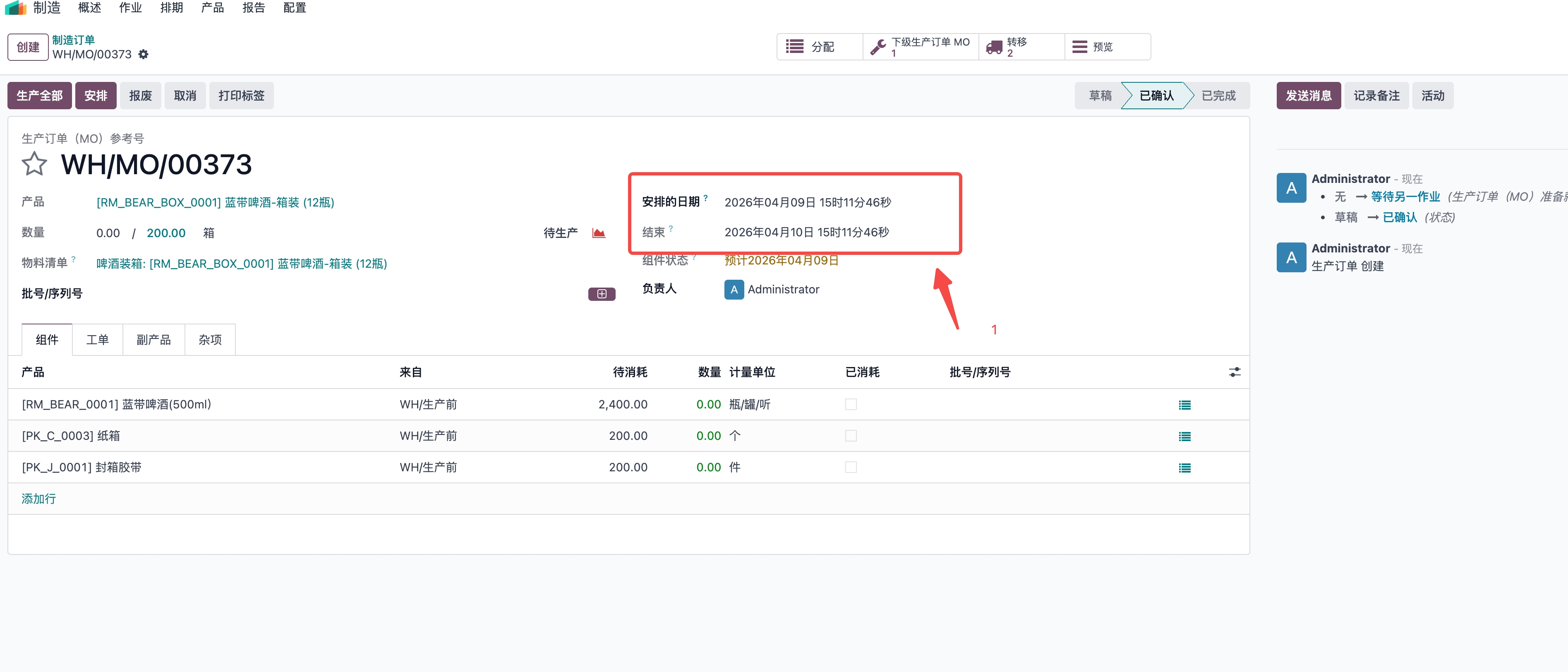
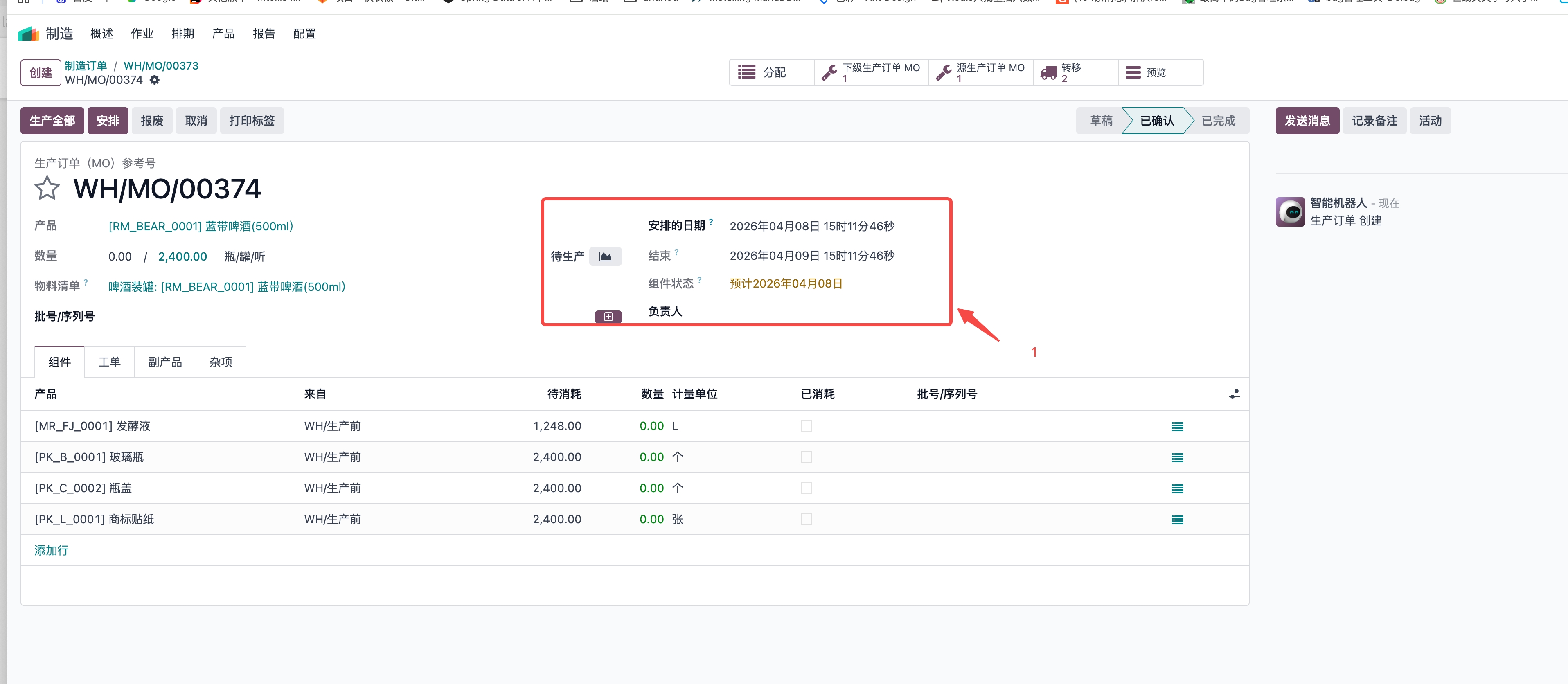
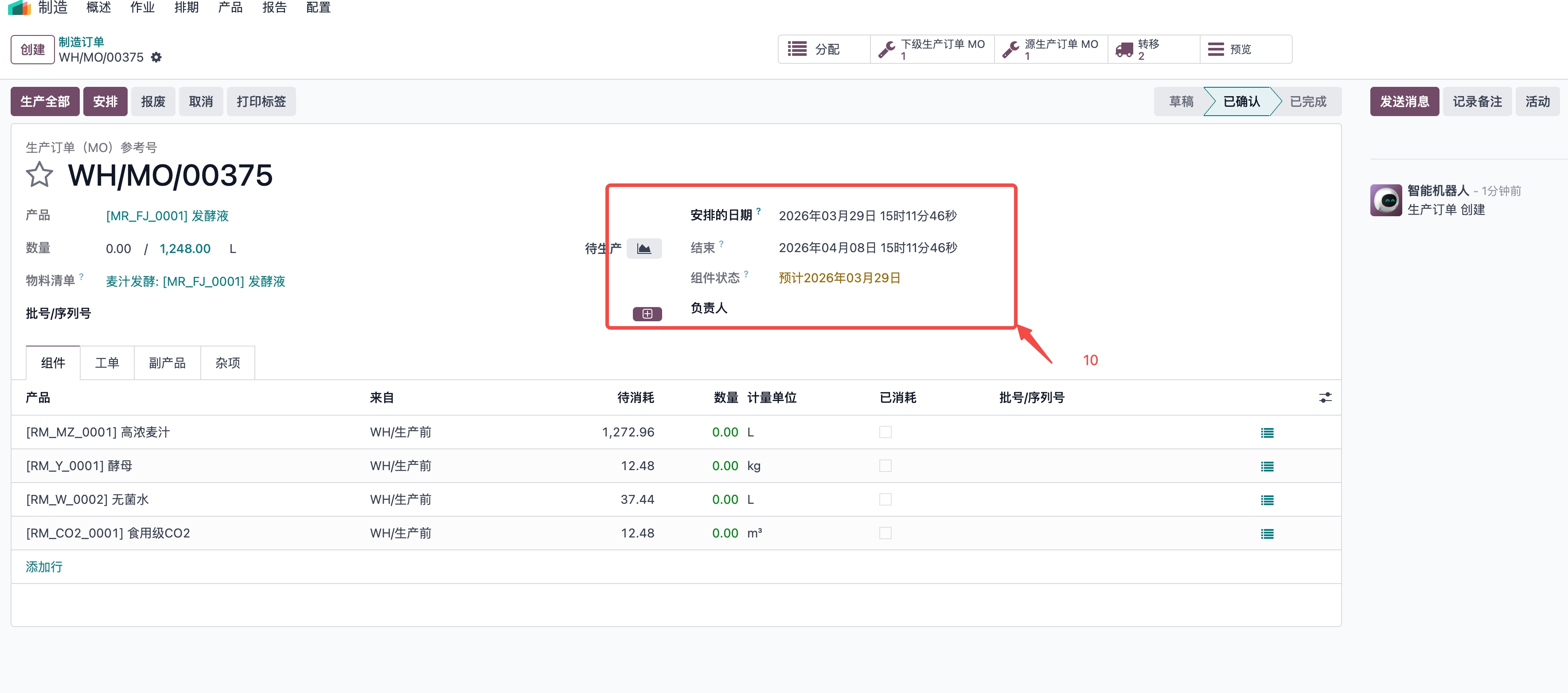
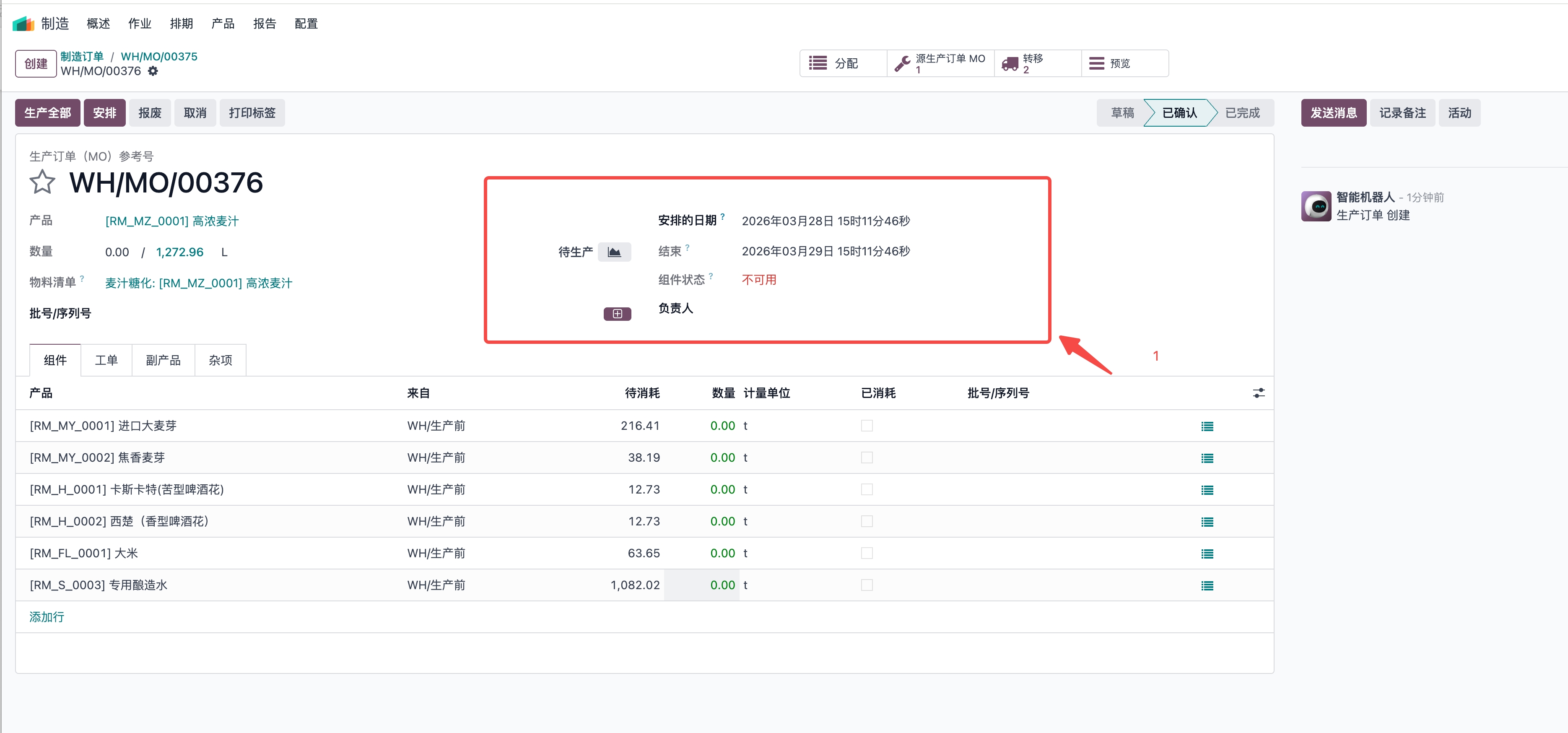 图上红色标出来的数字是我想告诉大家这是我配置在物料清单中的制造前置期,制造前置期前面我已经说过了,这个是笼统的规划此生产过程再这个时间范围内被认为已经生产完成。从图上我们可以看到在未点击「安排」之前,生产订单的结束日期(及时间)是基于「组件的预计时长总和」+「安排日期」初步计算的“理论结束时间”,当存在制造前置期的时候,组件的预计时长总和被认为是制造前置期配置的时间。我今天要说的就是这个“理论结束时间”。这个时间是未考虑工作中心产能、资源冲突、作业依赖等约束的“理想值”。我们需要理解的是生产订单中结束时间的计算逻辑,需结合 工作中心的产能(工作时间) 和 作业预计时长 来推导,最基本的核心逻辑是:生产订单的结束时间 = 安排日期 + 所有作业的预计时长总和(需结合工作中心的“工作时间规则”和“效率”调整实际可用时间)。 我们去看看源码代码逻辑:
def button_plan(self):
        """ Create work orders. And probably do stuff, like things. """
        orders_to_plan = self.filtered(lambda order: not order.is_planned)
        orders_to_confirm = orders_to_plan.filtered(lambda mo: mo.state == 'draft')
        orders_to_confirm.action_confirm()
        for order in orders_to_plan:
            order._plan_workorders()
        return True
def _plan_workorders(self, replan=False):
        """ Plan all the production's workorders depending on the workcenters
        work schedule.

        :param replan: If it is a replan, only ready and pending workorder will be taken into account
        :type replan: bool.
        """
        self.ensure_one()

        if not self.workorder_ids:
            return

        self._link_workorders_and_moves()

        # Plan workorders starting from final ones (those with no dependent workorders)
        final_workorders = self.workorder_ids.filtered(lambda wo: not wo.needed_by_workorder_ids)
        for workorder in final_workorders:
            workorder._plan_workorder(replan)

        workorders = self.workorder_ids.filtered(lambda w: w.state not in ['done', 'cancel'])
        if not workorders:
            return

        self.with_context(force_date=True).write({
            'date_start': min([workorder.leave_id.date_from for workorder in workorders]),
            'date_finished': max([workorder.leave_id.date_to for workorder in workorders])
        })
    def _plan_workorder(self, replan=False):
        self.ensure_one()
        # Plan workorder after its predecessors
        date_start = max(self.production_id.date_start, datetime.now())
        for workorder in self.blocked_by_workorder_ids:
            if workorder.state in ['done', 'cancel']:
                continue
            workorder._plan_workorder(replan)
            if workorder.date_finished and workorder.date_finished > date_start:
                date_start = workorder.date_finished
        # Plan only suitable workorders
        if self.state not in ['pending', 'waiting', 'ready']:
            return
        if self.leave_id:
            if replan:
                self.leave_id.unlink()
            else:
                return
        # Consider workcenter and alternatives
        workcenters = self.workcenter_id | self.workcenter_id.alternative_workcenter_ids
        best_date_finished = datetime.max
        vals = {}
        for workcenter in workcenters:
            if not workcenter.resource_calendar_id:
                raise UserError(_('There is no defined calendar on workcenter %s.', workcenter.name))
            # Compute theoretical duration
            if self.workcenter_id == workcenter:
                duration_expected = self.duration_expected
            else:
                duration_expected = self._get_duration_expected(alternative_workcenter=workcenter)
            from_date, to_date = workcenter._get_first_available_slot(date_start, duration_expected)
            # If the workcenter is unavailable, try planning on the next one
            if not from_date:
                continue
            # Check if this workcenter is better than the previous ones
            if to_date and to_date < best_date_finished:
                best_date_start = from_date
                best_date_finished = to_date
                best_workcenter = workcenter
                vals = {
                    'workcenter_id': workcenter.id,
                    'duration_expected': duration_expected,
                }
        # If none of the workcenter are available, raise
        if best_date_finished == datetime.max:
            raise UserError(_('Impossible to plan the workorder. Please check the workcenter availabilities.'))
        # Create leave on chosen workcenter calendar
        leave = self.env['resource.calendar.leaves'].create({
            'name': self.display_name,
            'calendar_id': best_workcenter.resource_calendar_id.id,
            'date_from': best_date_start,
            'date_to': best_date_finished,
            'resource_id': best_workcenter.resource_id.id,
            'time_type': 'other'
        })
        vals['leave_id'] = leave.id
        self.write(vals)
    def _get_first_available_slot(self, start_datetime, duration):
        """Get the first available interval for the workcenter in `self`.

        The available interval is disjoinct with all other workorders planned on this workcenter, but
        can overlap the time-off of the related calendar (inverse of the working hours).
        Return the first available interval (start datetime, end datetime) or,
        if there is none before 700 days, a tuple error (False, 'error message').

        :param start_datetime: begin the search at this datetime
        :param duration: minutes needed to make the workorder (float)
        :rtype: tuple
        """
        self.ensure_one()
        start_datetime, revert = make_aware(start_datetime)

        resource = self.resource_id
        get_available_intervals = partial(self.resource_calendar_id._work_intervals_batch, domain=[('time_type', 'in', ['other', 'leave'])], resources=resource, tz=timezone(self.resource_calendar_id.tz))
        get_workorder_intervals = partial(self.resource_calendar_id._leave_intervals_batch, domain=[('time_type', '=', 'other')], resources=resource, tz=timezone(self.resource_calendar_id.tz))

        remaining = duration
        start_interval = start_datetime
        delta = timedelta(days=14)

        for n in range(50):  # 50 * 14 = 700 days in advance (hardcoded)
            dt = start_datetime + delta * n
            available_intervals = get_available_intervals(dt, dt + delta)[resource.id]
            workorder_intervals = get_workorder_intervals(dt, dt + delta)[resource.id]
            for start, stop, dummy in available_intervals:
                # Shouldn't loop more than 2 times because the available_intervals contains the workorder_intervals
                # And remaining == duration can only occur at the first loop and at the interval intersection (cannot happen several time because available_intervals > workorder_intervals
                for _i in range(2):
                    interval_minutes = (stop - start).total_seconds() / 60
                    # If the remaining minutes has never decrease update start_interval
                    if remaining == duration:
                        start_interval = start
                    # If there is a overlap between the possible available interval and a others WO
                    if Intervals([(start_interval, start + timedelta(minutes=min(remaining, interval_minutes)), dummy)]) & workorder_intervals:
                        remaining = duration
                    elif float_compare(interval_minutes, remaining, precision_digits=3) >= 0:
                        return revert(start_interval), revert(start + timedelta(minutes=remaining))
                    else:
                        # Decrease a part of the remaining duration
                        remaining -= interval_minutes
                        # Go to the next available interval because the possible current interval duration has been used
                        break
        return False, 'Not available slot 700 days after the planned start'
从代码逻辑上我们可以知道odoo 的生产订单结束时间由工作中心的“工作时间日历”和作业的“预计时长”共同决定,公式为:结束时间 = 安排日期 + (Σ作业预计时长) × (1 / 工作中心时间效率)。同时,需考虑工作中心的“工作时间规则”(如每天工作 8 小时,全天生产 24 小时等)实际可用时间 = 工作中心每天工作小时数 × 天数。 因此,正确的计算需结合: 工作中心的每天工作小时数(如截图中“每天平均小时数 8:00”即每天工作 8 小时)。 作业的预计时长总和(13095 分钟 = 218.25 小时)。 工作中心的时间效率(如 100% 则无折扣)。 举个例子: 假设作业预计总时长为218.25小时,每天工作12小时,工作中心时间效率100% 那么总时长 218.25 小时 / 12 小时/天 = 18.1875天(即18天+0.1875* 12 = 2.25小时) 安排日期:2026年03月30日 14:55:24 18天后:3月30日+18天= 2026年04月17日(3月由31天,30+18=48--》48-31=17,即4月17日) 加上2.25小时(2小时15分)14:55:24 + 2 小时 15 分钟 = 17:10:24 最终结束时间:2026年04月17日 17:10:24
** 总结: ** 结束时间的计算逻辑是:
结束时间 = 安排日期 + (作业预计时长总和 ÷ 工作中心每天工作小时数)
安排后:结束时间 = 系统根据实际产能、资源、依赖等约束,重新调度后的可行结束时间(更贴近实际生产
下面的图片是odoo生产订单的结束时间计算逻辑,根据工作中心的工作时间日历和作业的预计时长,计算出生产订单的结束时间。工作中心的时间效率是100%,每天工作24小时。 
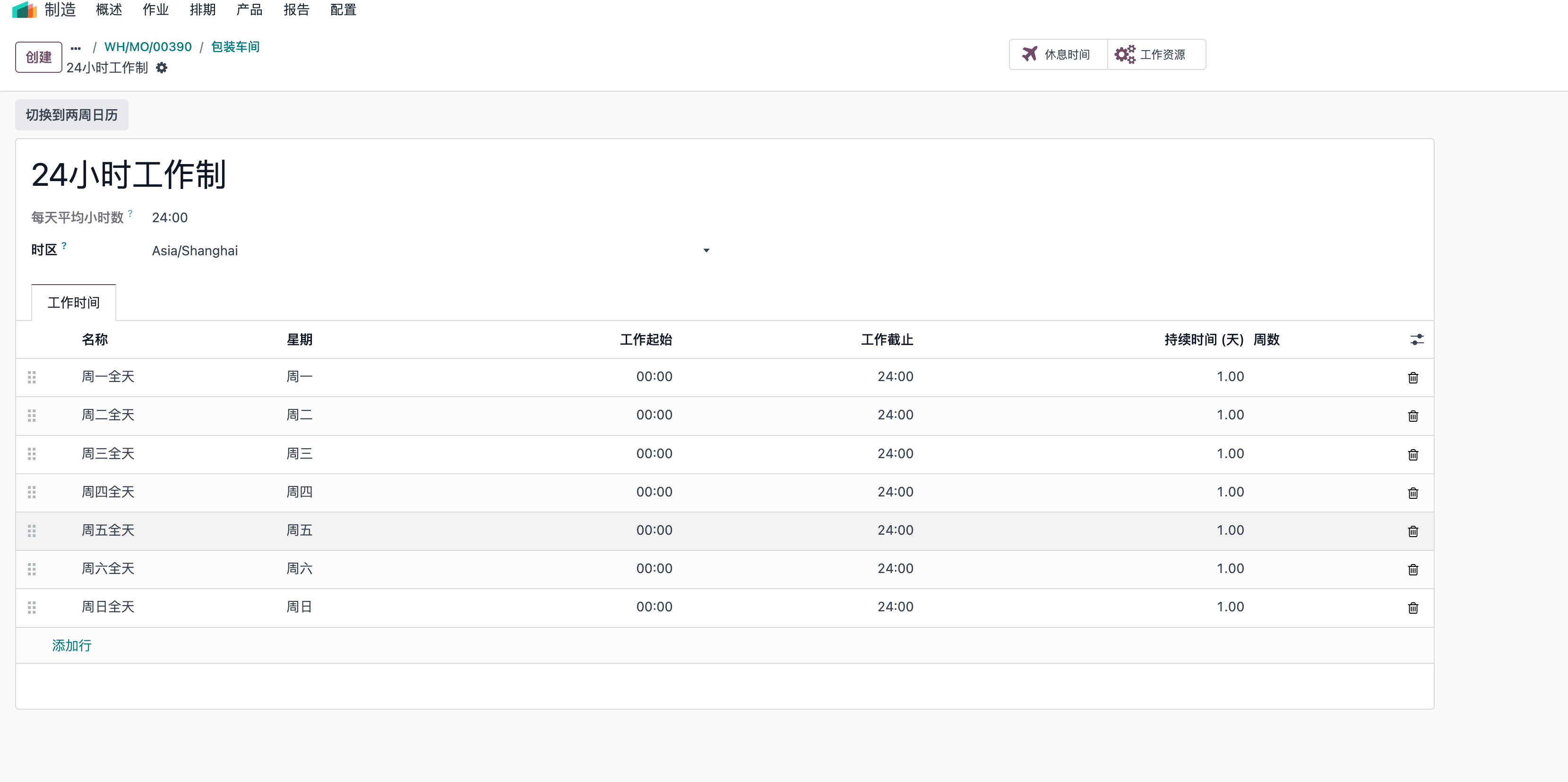
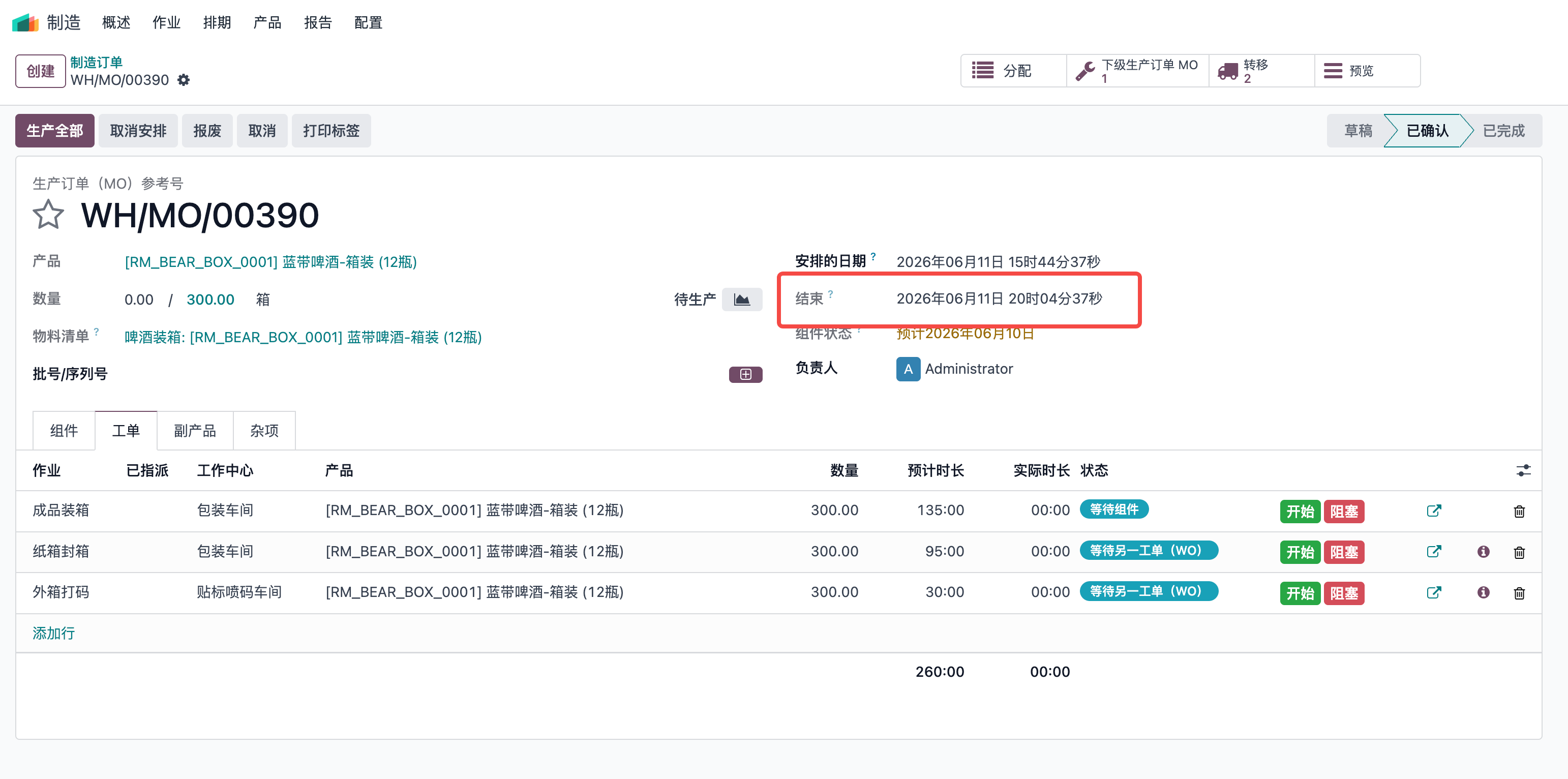
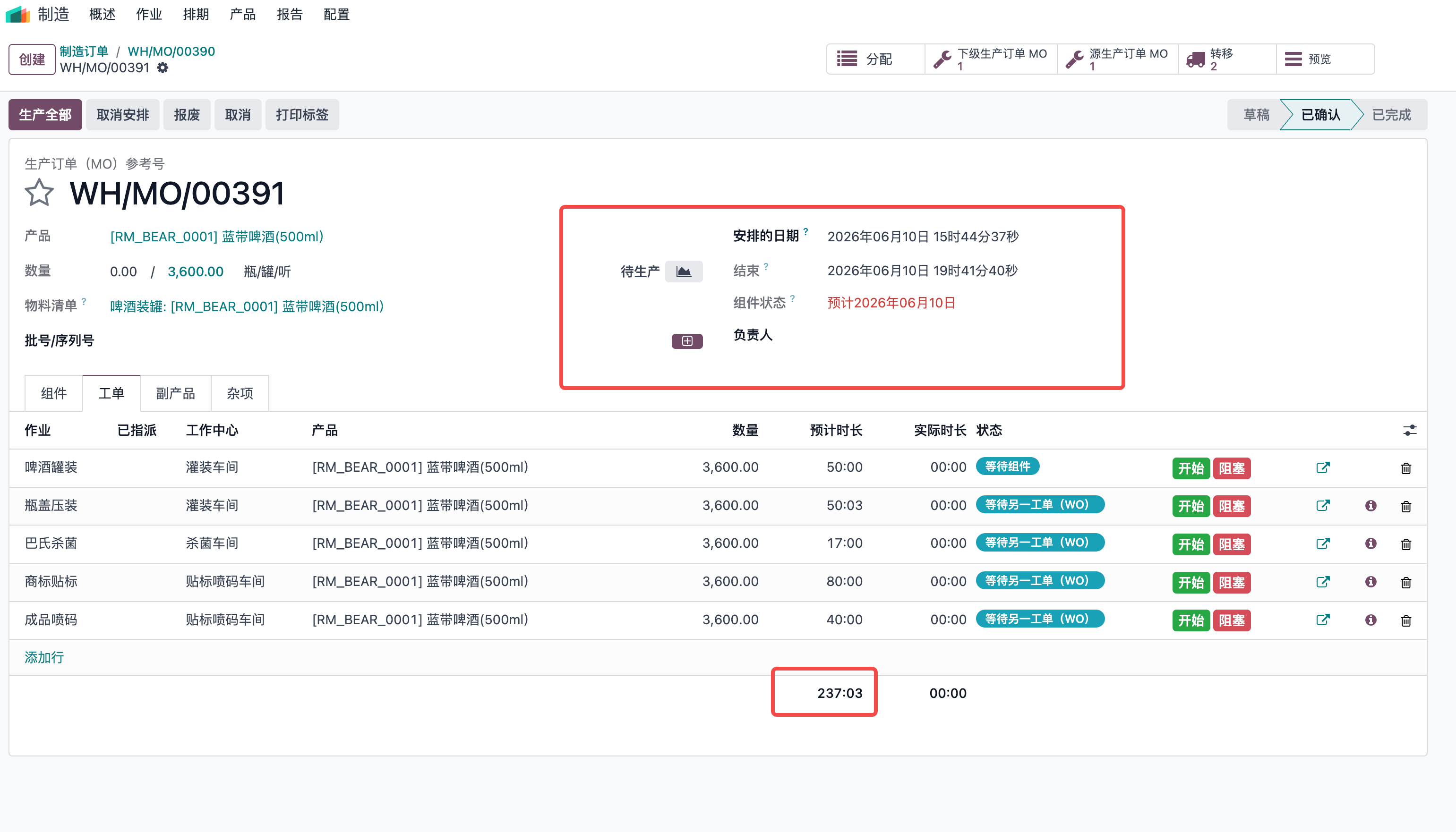
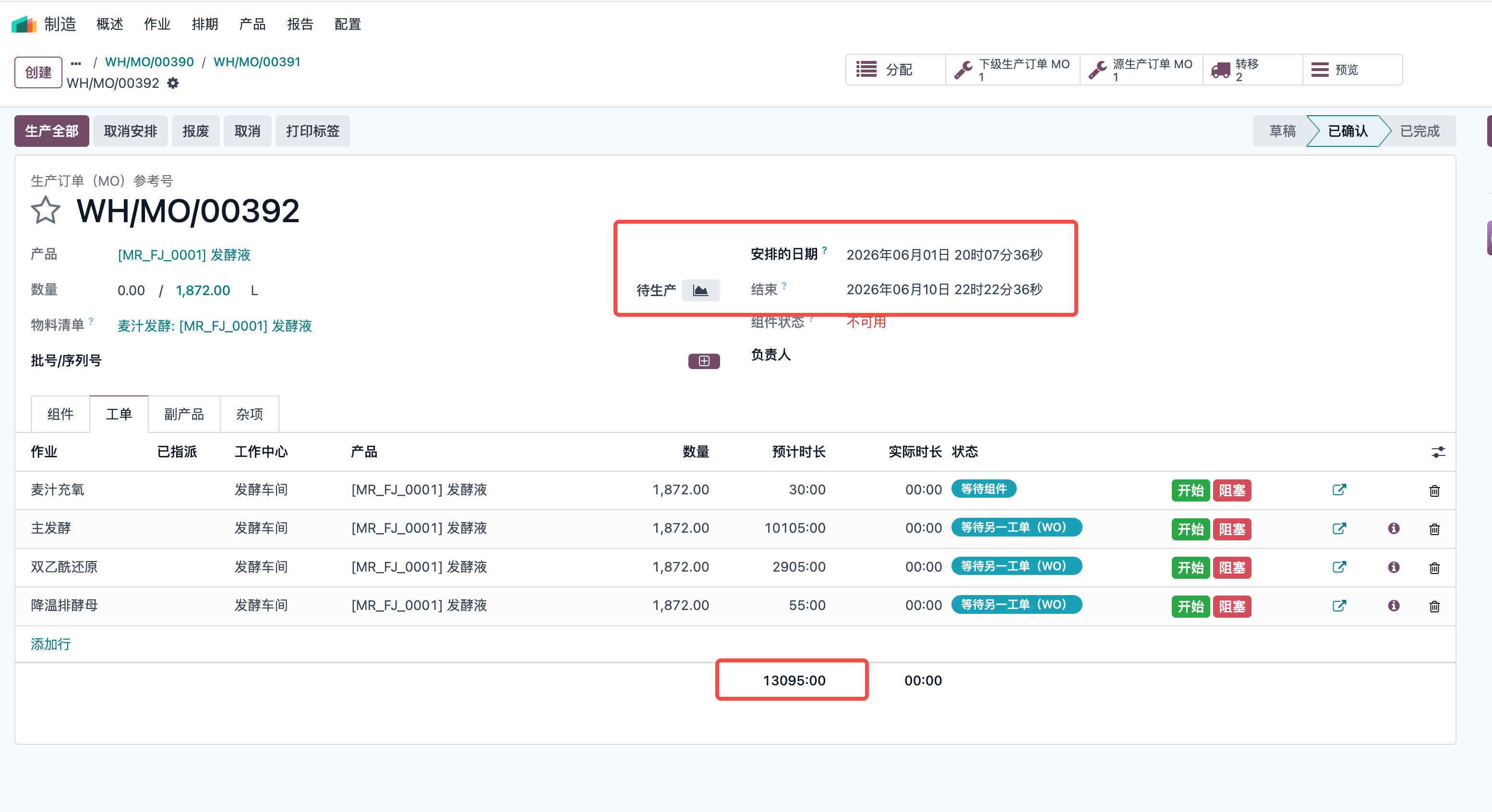
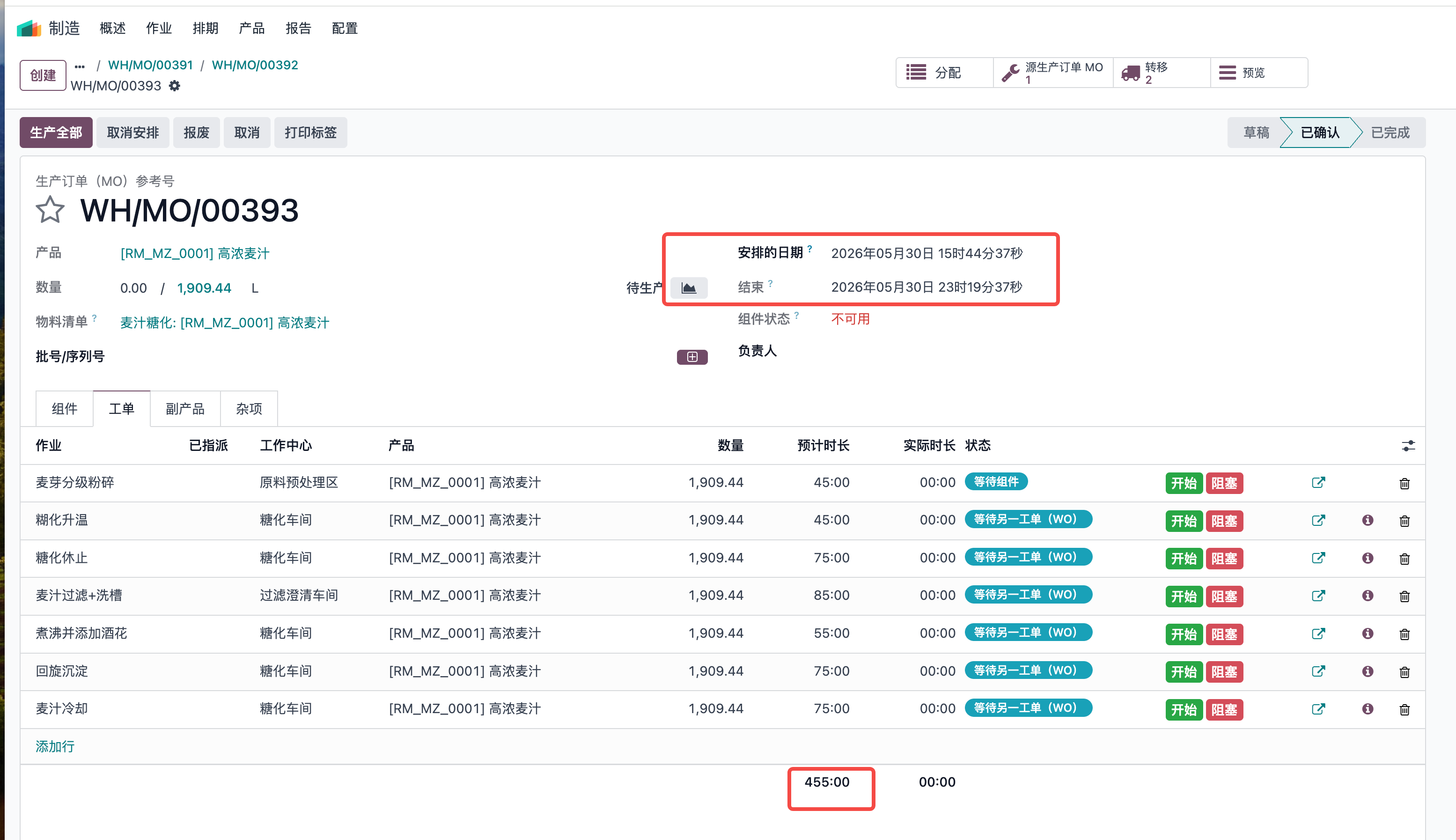
这也就意味着我们在做生产排程的时候,必须要很清楚各个工作中心的产能,时间效率,每天工作小时数,作业的预计时长,以及每个生产订单的依赖关系,整个生产下来整体预计耗时多长时间,根据这些数据依据作出更贴近实际生产的计划排程表。